Shadow AI Discovery · Free 30-day assessment
Shadow AI discovery: find the AI in use that isn't on your approved list
AI adoption moves faster than approval. Your approved list shows what's allowed, not what's in use. Kindo pulls the evidence you already have across SIEM, endpoint inventory, identity, cloud app discovery, DLP and RMM tools into a single view of AI usage you can investigate and act on.
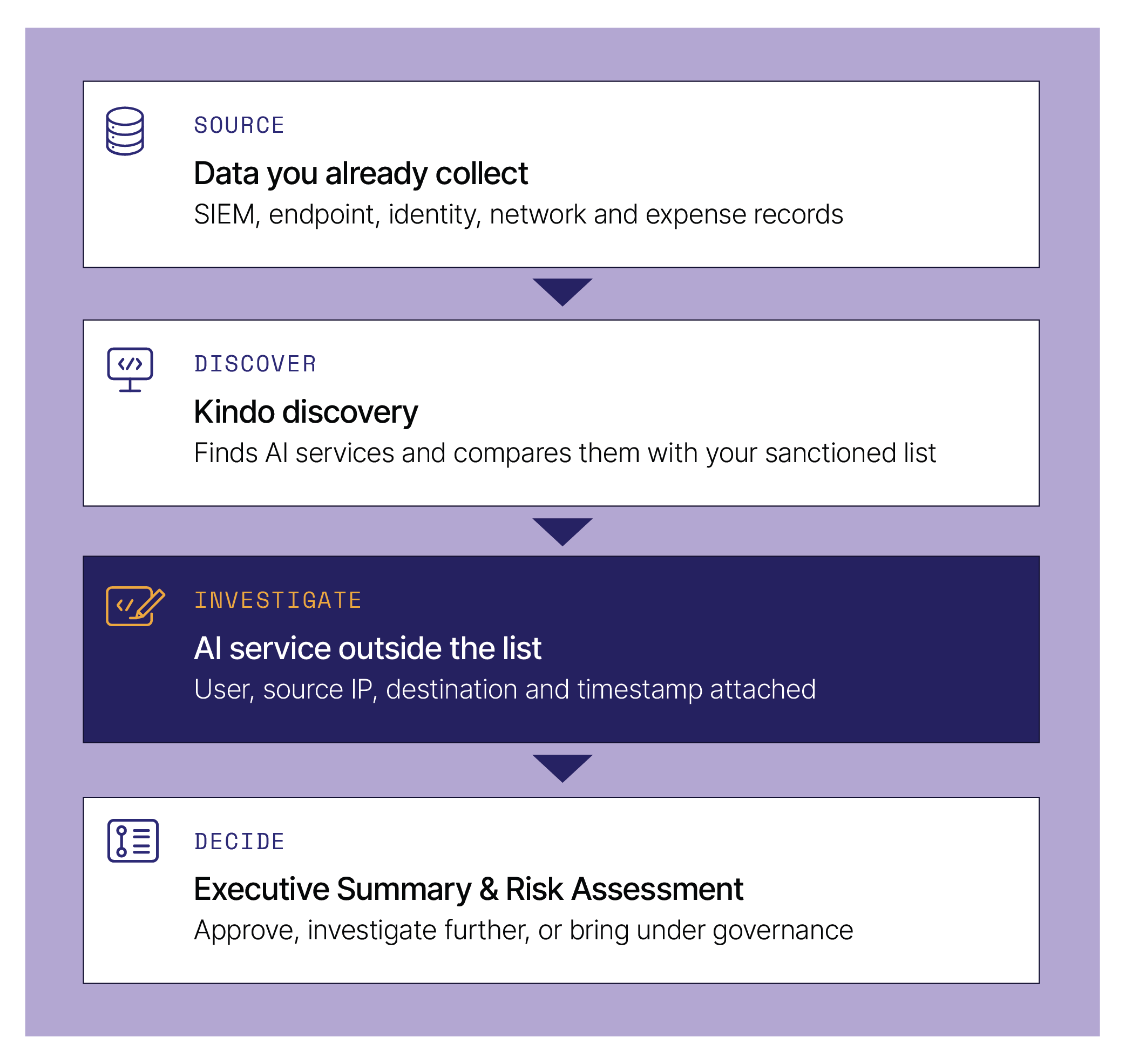
Illustrative. Findings depend on the sources you connect.
Read-only access
Guided setup
Executive-ready reports
Your free Shadow AI assessment at a glance
45 min
Guided setup session
30 days
Assessment period
2 reports
Executive Summary · Risk Assessment
You'll need a Docker-capable host and access to the sources you want to include. Kindo provides a requirements guide and an engineer. Continuing discovery or adding governance is a separate decision after the results review.
What is Shadow AI discovery?
Shadow AI discovery finds AI tools and services used outside your organization's approval process. Kindo looks for evidence of that usage in the systems you connect, then gives security and IT what they need to review it. Discovery is not enforcement. Finding a service doesn't approve it or block it. It gives you the evidence to make that call.
What it is
Discovery
Finds AI services in connected data and compares them with your sanctioned list.
Delivery
Free 30-day assessment
Guided setup, a midpoint check-in and a results review. Inference included.
Runs on
Your host + Kindo cloud
One Docker container on a host you control. Analysis in Kindo's cloud platform.
Connects to
Your SIEM, read-only
Google SecOps, Splunk, Microsoft Sentinel, Elastic or Wazuh, plus other supported sources.
Connects to
Existing tools
Your Microsoft management tools, RMM tools and any REST API tool with potential AI usage information.
Not
Enforcement
Nothing is blocked or changed. Governance and runtime controls are evaluated separately.
Why does Shadow AI discovery matter?
AI adoption moves faster than approval. Your approved list says what's allowed; it can't say what's in use. Meanwhile, your SIEM, endpoint and network tools already record the signals. Discovery turns them into a view of AI usage you can investigate and act on.
Your approved list
records what has been sanctioned
Your logs
record what's actually happening
The gap
is where policy decisions get made without evidence
Option A
Ask teams to self-report
Easy to run. Only as complete as what people remember to declare.
Option B
Block a list of known AI domains
Stops some tools. Tells you nothing about what's already in use, or by whom.
Kindo discovery
Start from evidence
Find AI services in the data you already collect, see who's using them, and decide what belongs in your environment.
What problems does Kindo solve?
Each gap in AI governance comes down to missing evidence. Discovery adds it by connecting to the SIEM, endpoint, identity and data-protection sources your organization already runs, not just one of them. Your policies, approval workflows and existing tools stay where they are.
Tools outside the approved list
Your inventory shows what's sanctioned, not what teams adopted on their own.
Kindo → Compares AI services in connected sources with your sanctioned list.
Your approval process stays the same.
Evidence scattered across systems
AI evidence sits across SIEM logs, endpoint inventories, cloud app discovery, identity, DLP and RMM tools. No single system sees it all, and nobody joins it up.
Kindo → Brings these sources into one review.
Your SIEM keeps collecting.
Usage that needs investigation
An unfamiliar destination shows up. It's not clear who's using it or why.
Kindo → Attaches user, source IP, destination and timestamp to each finding.
Your teams confirm the purpose.
Policy without a usage baseline
AI policy reviews start from opinion because nobody has measured adoption.
Kindo → Gives security, IT and compliance one shared set of findings.
Your policy owners make the call.
How does Kindo discover Shadow AI?
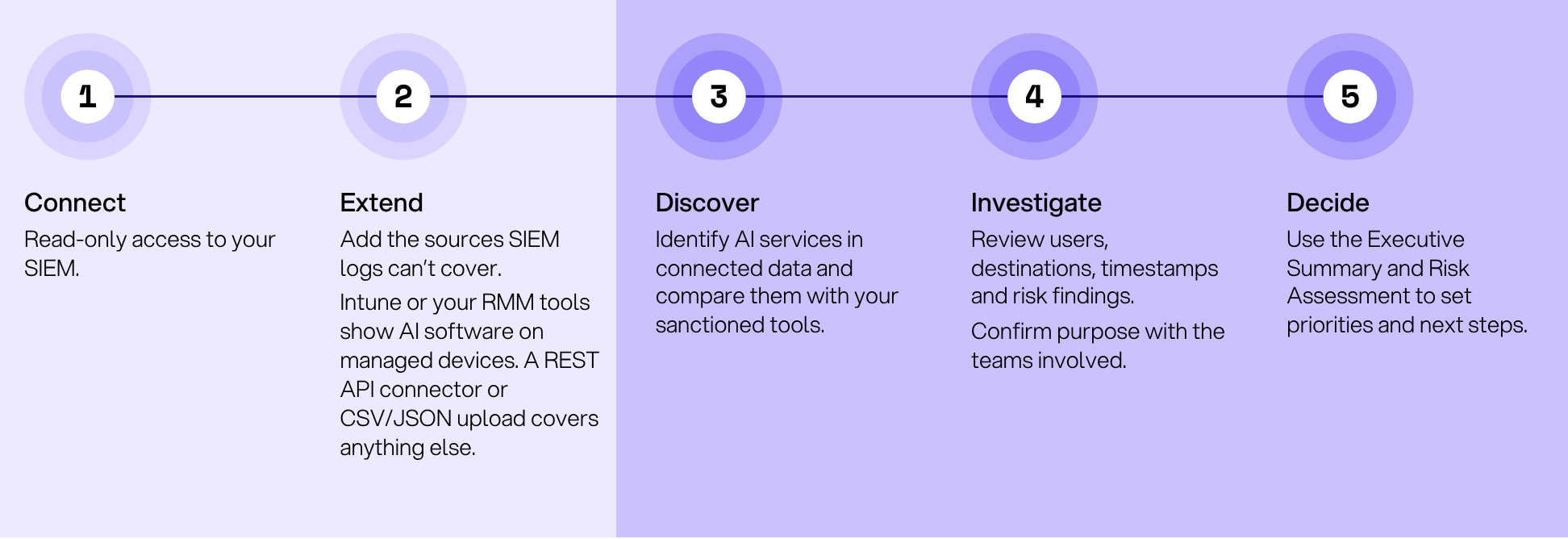
Connect. Extend. Discover. Investigate. Decide. Access is read-only throughout, and nothing in your environment is blocked or changed. A Kindo engineer handles setup with you.
Access
Read-only service account or API credential. Kindo never writes to your SIEM.
Runs
One Docker container on a host you control, connected to Kindo's cloud platform for analysis.
More sources
Any of these sources beyond your SIEM: Intune (managed-device software inventory), Entra ID (AI service principals and app registrations), Defender for Cloud Apps (cloud AI SaaS usage), Purview (DLP alerts involving AI services), RMM tools such as Atera, ConnectWise, NinjaOne or Syncro (installed software per device), a generic REST API endpoint (with Kindo AI normalization for classification), and CSV/JSON file upload for proxy logs, firewall exports, expense data or any other structured export. Your engineer confirms which sources apply and whether an API, scheduled export or CSV fits each one. Visibility depends on the sources connected and the data they contain; one source doesn't cover all AI usage.
Inference
Included. Kindo covers it for the assessment.
Setup checks
Your engineer reviews the sanctioned list and provider classifications and confirms events are arriving.
Enforcement
None. The assessment discovers and reports; it doesn't block anything.
Supported SIEM
Google SecOps
Splunk
Microsoft Sentinel
Elastic
Wazuh
What will you gain from a Shadow AI assessment?
A single, corroborated view of AI usage drawn from SIEM, endpoint, cloud, identity and DLP sources, not just network logs. The context to investigate each finding. And two reports built on your own data, ready for your CISO, CIO and AI policy owners.
Visibility
An AI service inventory
What's in use across connected sources, next to what's approved.
Context
Evidence to investigate
User, source IP, destination and timestamp for each finding.
Leadership
An Executive Summary
The findings and the decisions that need attention.
Priorities
A Risk Assessment
Supporting detail to rank follow-up by risk.
Next step
A guided results review
Work through findings with Kindo and agree what happens next.
Day one
Connect and start discovery
Deploy the container, connect your SIEM read-only, run the first scan, and agree additional sources.
45 min · guided
Midpoint
Check the data and early findings
Review collection, close any source gaps, and look at what's emerging.
30 min
Day 30
Review the evidence and next steps
Get your reports before the meeting. Continue discovery, explore governance, or close out.
45 min
For example
An unfamiliar AI service appears in connected logs. Security reviews the usage context, confirms its purpose with the team, and decides: sanction it, investigate further, or move the work to an approved alternative.
Who is Shadow AI discovery for?
Security and IT leaders who need a clear picture of AI adoption. Security and IT coordinate access and investigation; compliance and finance bring the policy and spend questions the findings should answer.
Owners
Security and IT leaders
Own source access, the investigation and the approval decisions.
Supporting
Compliance and risk
Use findings in AI policy reviews and audit discussions.
Expansion
Finance
With expense data connected, review AI vendor spend alongside usage.
A good fit when you're
Preparing an AI acceptable-use
policy review
Investigating unfamiliar
AI services
Setting a baseline before expanding AI adoption
What signals and data can I analyze?
Shadow AI discovery allows you to access and monitor data sources from across your business.
SIEM
Google SecOps, Splunk, Microsoft Sentinel, Elastic, Wazuh
Security
standard
Endpoint & RMM
Intune and supported RMM tools
IT ops
where supported
Identity
Entra ID sign-in and app signals
IT
where supported
Network
Proxy and firewall logs, by export
Security
no SIEM? start here
Expense data
AI vendor spend, by export or CSV
Finance
expansion
Why choose Kindo for Shadow AI discovery?
Other approaches rely on what people self-declare or on fixed lists of known tools, and most use only one evidence layer. Discovery starts from evidence already collected across your SIEM, endpoint, identity, cloud app and DLP systems, joins those signals into one normalized view, adds the context to investigate, and gives you a path into ongoing governance.
Approach
How it finds AI
What you learn
What you're left with
Self-reported surveys
Teams declare the tools they use
What people remember to mention
A list of declarations
Known-domain blocklists
A fixed list of AI domains
Which known tools were blocked
Blocked requests, no usage picture
Approved-tool inventory
Records what's been sanctioned
What's allowed, not what's used
A register
Kindo discovery
Evidence across your SIEM, endpoint, identity, cloud app and DLP sources, compared with your sanctioned list
Which services, who used them, where and when
An Executive Summary, a Risk Assessment and a path to governance
Resources
Go deeper on enterprise AI control

Shadow AI discovery FAQ
Frequently asked questions
Can Kindo discover AI usage without a SIEM?
Yes. The assessment can use alternative sources such as endpoint or identity data and uploaded network log exports. Your Kindo engineer confirms the available sources and the right connection method during setup.
Does Kindo need write access to our SIEM?
No. Discovery connects to supported SIEM platforms with read-only access. Kindo reads the relevant data and never writes to your SIEM.
Which additional sources can we include?
Intune or Entra ID, RMM tools, proxy or firewall logs, and expense data. Your engineer confirms support and whether an API, scheduled export or CSV fits each source. Visibility depends on the sources connected and the data they contain; one source doesn't cover all AI usage.
Does the free assessment block unapproved AI?
No. The assessment covers discovery and analysis: it gives you evidence to review AI services and set priorities. Governance and runtime enforcement are evaluated separately.
Does all assessment processing stay on our host?
No. The assessment uses a Docker component on your host and Kindo's cloud platform for analysis. Confirm data flows and your handling requirements before connecting sources. Fully on-premises requirements need a separate deployment discussion.
Do the findings show what users put into AI tools?
No. User, source IP, destination and timestamp metadata supports an investigation, but it isn't proof of what was in a prompt or uploaded file. Findings reflect the sources connected, the period reviewed, and what those sources record.
Does a high risk rating mean a policy violation?
No. A risk rating is a signal to prioritize follow-up and examine in context, not evidence that an event broke policy or exposed data. Kindo reviews the sanctioned list and provider classifications with you before final reporting.
Will setup be done in 45 minutes?
The 45 minutes is a scheduled, guided session, not a guarantee of complete deployment or early findings. Collection depends on source access and readiness. Kindo works through any missing prerequisites with your team.
What happens after the 30 days?
You receive the Executive Summary and Risk Assessment and review them with Kindo. Then you can discuss a subscription to continue discovery, evaluate broader governance, or close out with the reports as your leave-behind.