





Transcript
How Kindo's Admin Portal Makes Agentic AI Production-Ready
The hardest part of putting AI agents into production for most organizations is making them controllable.
Every enterprise that has tried to scale agentic automation hits the same wall. A security analyst builds an agent that queries Splunk and creates Jira tickets. Within a month there are fifteen variants running across three teams.
No one knows which ones can access what data. No one can produce an audit trail. The SOC manager finds out about half of them only when something breaks.
The capability gap has closed but the governance gap hasn't. Kindo's admin portal exists to solve this problem: a control plane that governs how AI powered automation executes across your organization.
The Architecture - Governance as an Execution Layer
Kindo's platform governance module sits at the center of the AI ecosystem. On one side, MCP servers expose tools from Splunk, Palo Alto, GitHub, Kubernetes, ServiceNow, Jira, Slack, Elastic, Linear, and others. On the other side, LLMs from multiple providers (DeepSeek, Gemini, GPT-4o, Claude, Command R, Qwen, Llama) provide reasoning capabilities. Users interact through autonomous agents or chat interfaces, with data persisted across SQL databases, object stores, and vector databases.
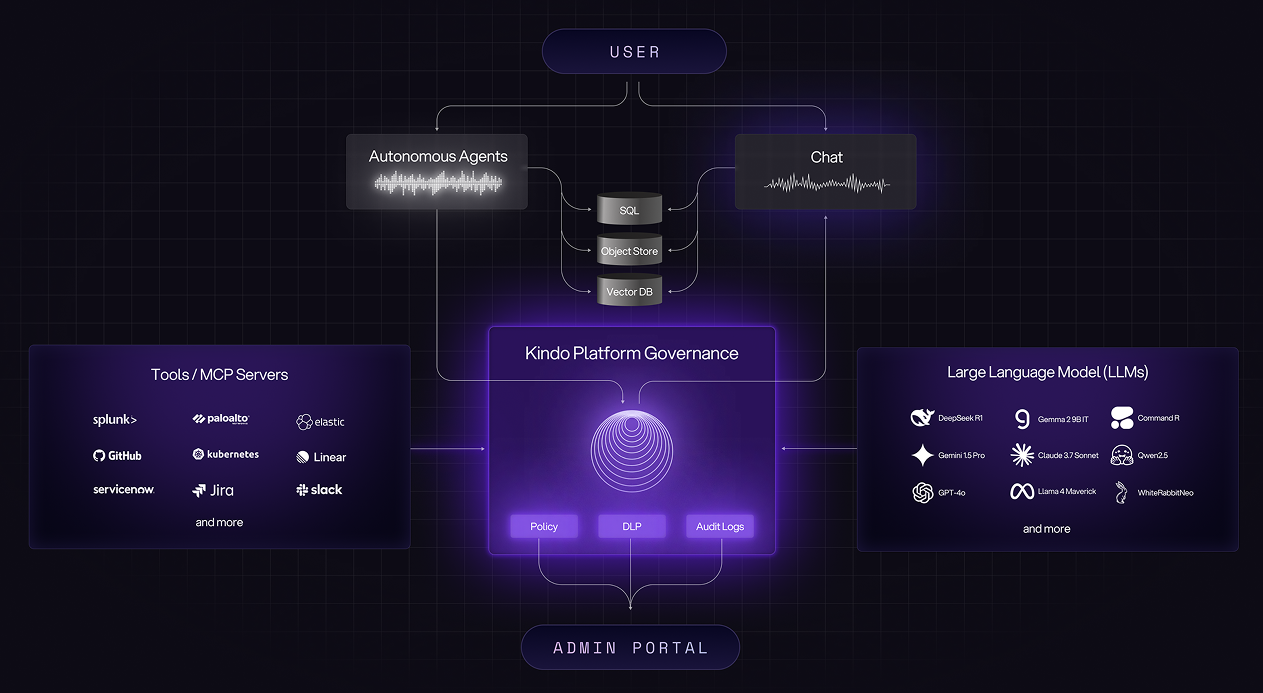
None of these components talk directly to each other. Every interaction passes through the governance layer, which enforces three core functions: policy, DLP, and audit logs. The admin portal is where administrators configure all of this.
This means every action taken by an AI agent is:
• Identity-bound. The agent inherits the identity of the user or service account that invoked it. When an agent queries your SIEM or creates a ticket, the audit log shows which human or system initiated that action.
• Fully auditable. Every prompt, response, tool call, and model interaction is logged in structured JSON format, exportable for compliance review or incident investigation.
• Policy-scoped. Before any tool invocation or model call executes, the governance layer checks whether the requesting identity has permission. The policies are defined once in the admin portal and enforced everywhere.
• Approval-aware. For sensitive operations, administrators can require explicit approval before execution proceeds.
Default Settings - Organization-Wide Controls
The admin portal also lets administrators establish baseline controls that apply across all users and agents in the organization.
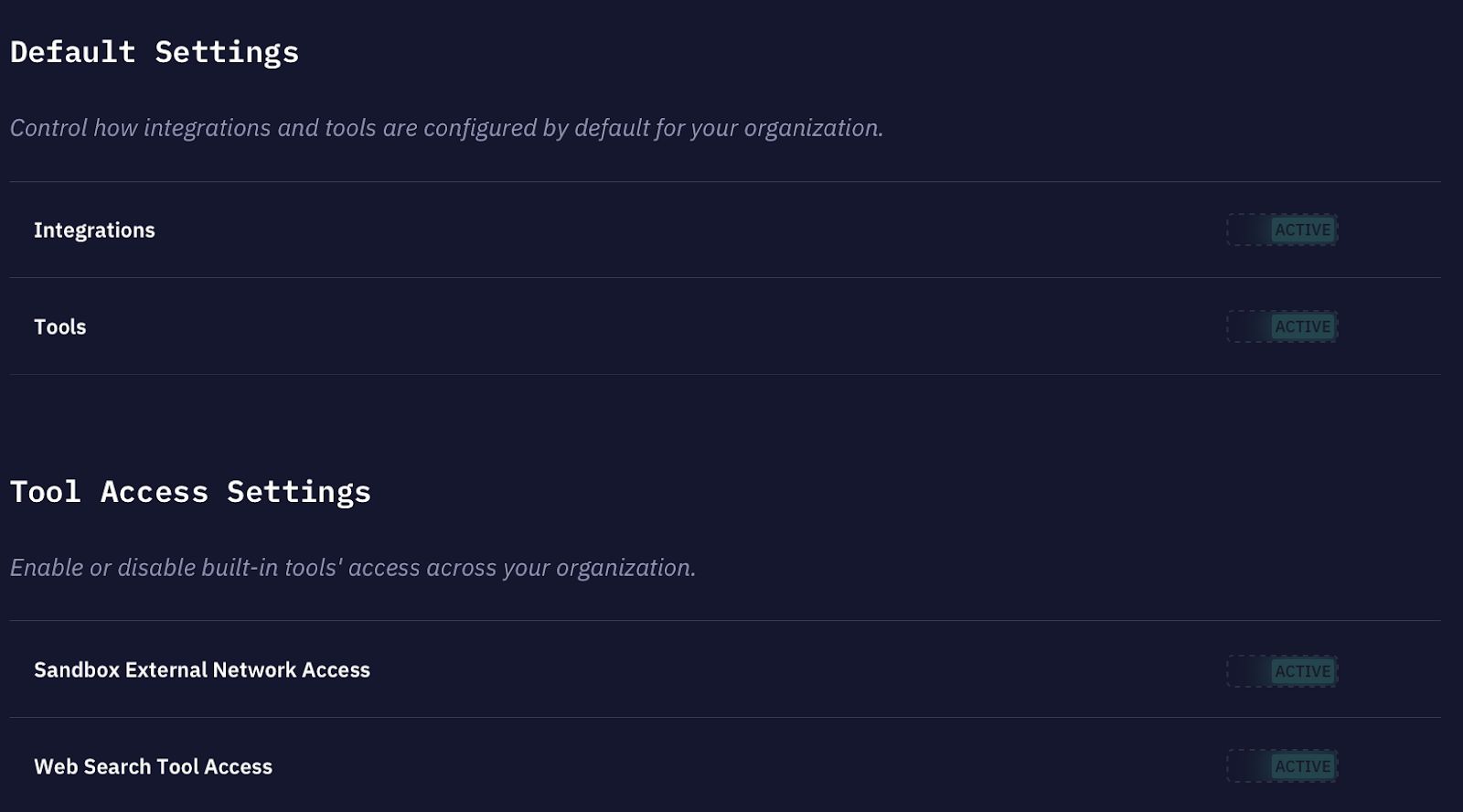
Integrations control whether third-party MCP server connections are enabled by default. When active, users can connect agents to approved integrations like GitHub, Jira, or Splunk without requesting access. When inactive, each integration must be explicitly enabled.
Tools control whether built-in Kindo capabilities (code execution, file manipulation, data transformation) are available by default.
Sandbox external network access determines whether code running in Kindo's sandboxed environment can make outbound network requests.
Web search tool access controls whether agents can query the open web. In regulated environments, you may want agents restricted to internal data sources and approved integrations only.
These defaults mean new agents start in a controlled state. Teams can be granted exceptions through role-based policies, but the security posture is established at the organization level, not left to individual users.
Model Access and DLP Controls
Something else to note is that not all models are appropriate for all use cases. The admin portal gives administrators control over which LLM providers and specific models are available, and whether DLP filters apply to interactions with those models.
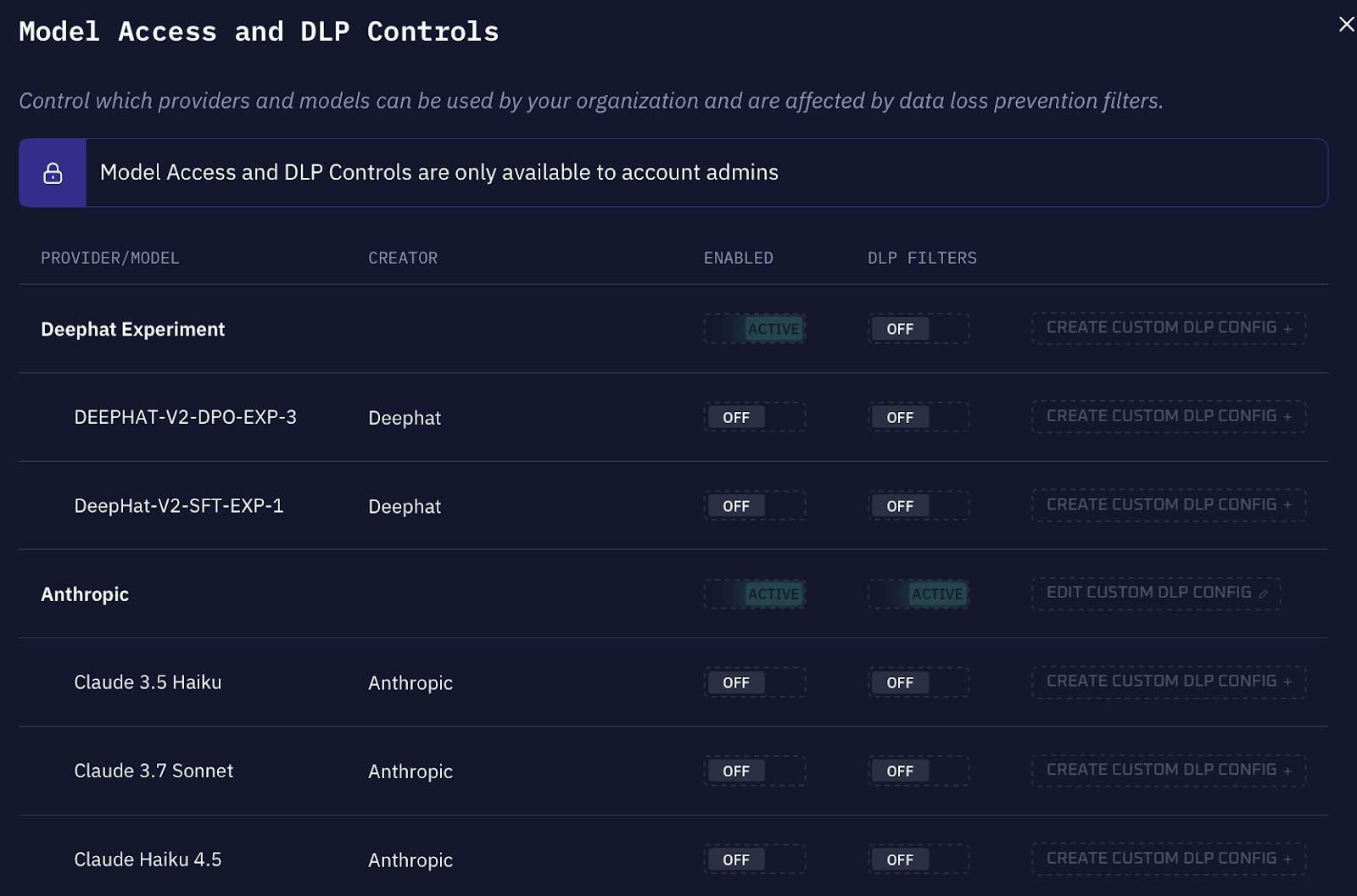
For each provider, administrators can enable or disable access at the provider level, then configure individual models within that provider.
DLP filters can be applied per-provider or per-model. These filters scan prompts and responses for sensitive content before they reach external models: SSNs, API keys, credentials, proprietary code patterns, or content matching specific sensitivity labels. The DLP configuration integrates with Kindo's data classification system, so you can build rules based on how your organization has already labeled sensitive data.
Separation of Execution and Governance
Kindo enforces a clean separation between operational execution and administrative governance.
Practitioners (security analysts, DevOps engineers, IT operators) work in Kindo's AI terminal. This interface is optimized for investigation, remediation, and delivery. The analyst doesn't configure governance because governance is already enforced at the platform level.
Administrators and security leaders operate in the admin portal. They define policies that constrain workflows: which models are available, which tools can be invoked, which integrations are permitted, what requires approval, and how aggressively DLP filters scan content.
Consistent Governance Across Deployment Models
These capabilities are identical regardless of whether Kindo runs as SaaS or fully self-hosted within customer infrastructure.
For organizations in regulated industries, this matters. You can deploy Kindo entirely within your own AWS, Azure, or GCP environment, or on-premises behind your firewall. The governance controls don't change.
Audit logs remain exportable in the same structured format, whether stored in Kindo's infrastructure or your own object storage. Approval workflows enforce the same policies regardless of where the platform runs. DLP filters operate identically whether traffic stays within your network or passes through Kindo's cloud.
What This Enables
When governance is embedded directly into the execution path, organizations can operationalize agentic automation quickly without the risks that typically accompany it.
• No shadow automation. Every agent runs through the governance layer. You can't spin up a rogue workflow that bypasses policy because there's no execution path that doesn't pass through the control plane.
• No policy drift. Defaults are enforced at the organization level. When a new team onboards, they inherit the baseline security posture. Exceptions are explicit and auditable.
• No compliance blind spots. Audit logs capture every action in structured, exportable format. SOC 2 auditors, internal compliance teams, and incident responders all get the same complete record.
• No approval bottlenecks. Approval workflows apply only to operations you've flagged as sensitive. Routine automation executes immediately; high-risk actions wait for sign-off.
Kindo's admin portal is about making automation viable at enterprise scale by ensuring that every AI powered action is intentional, controlled, and provable.
Governance stops being the thing that slows you down. It becomes the thing that lets you move fast without losing control.
Request a demo to see how Kindo's governance architecture works in practice.