Transcript
A Guide to AI-Native SOC Workflows (Q1 2026)
.webp)
Security operations today are built around an alphabet soup of tools: SIEM, SOAR, EDR, XDR, plus countless dashboards to connect them. Yet incidents still slip through, analysts drown in alerts, and investigations stall.
According to industry research, SOC teams receive around 4,500 alerts per day and can't triage two-thirds of them, with 83% turning out to be false positives. The result is overwhelmed teams juggling siloed systems while attackers exploit the chaos. But what if you didn't need disconnected point products at all?
An AI-native SOC workflow is a unified operational loop that leverages LLMs and probabilistic agents to ingest cross-domain telemetry, reason about risk, and execute remediation. Unlike legacy rules-based systems, it treats your entire stack as one platform. AI agents ingest alerts, execute response actions via API integrations, verify outcomes, and adapt as threats evolve.
In this post, we walk through five workflows that become radically simpler when built on an AI-native foundation. Each workflow replaces manual work with an AI-powered loop that detects, acts, and proves resolution from one unified platform. The result is a leaner, faster SOC that turns detection into resolution.
1. Incident Correlation & Timeline Reconstruction
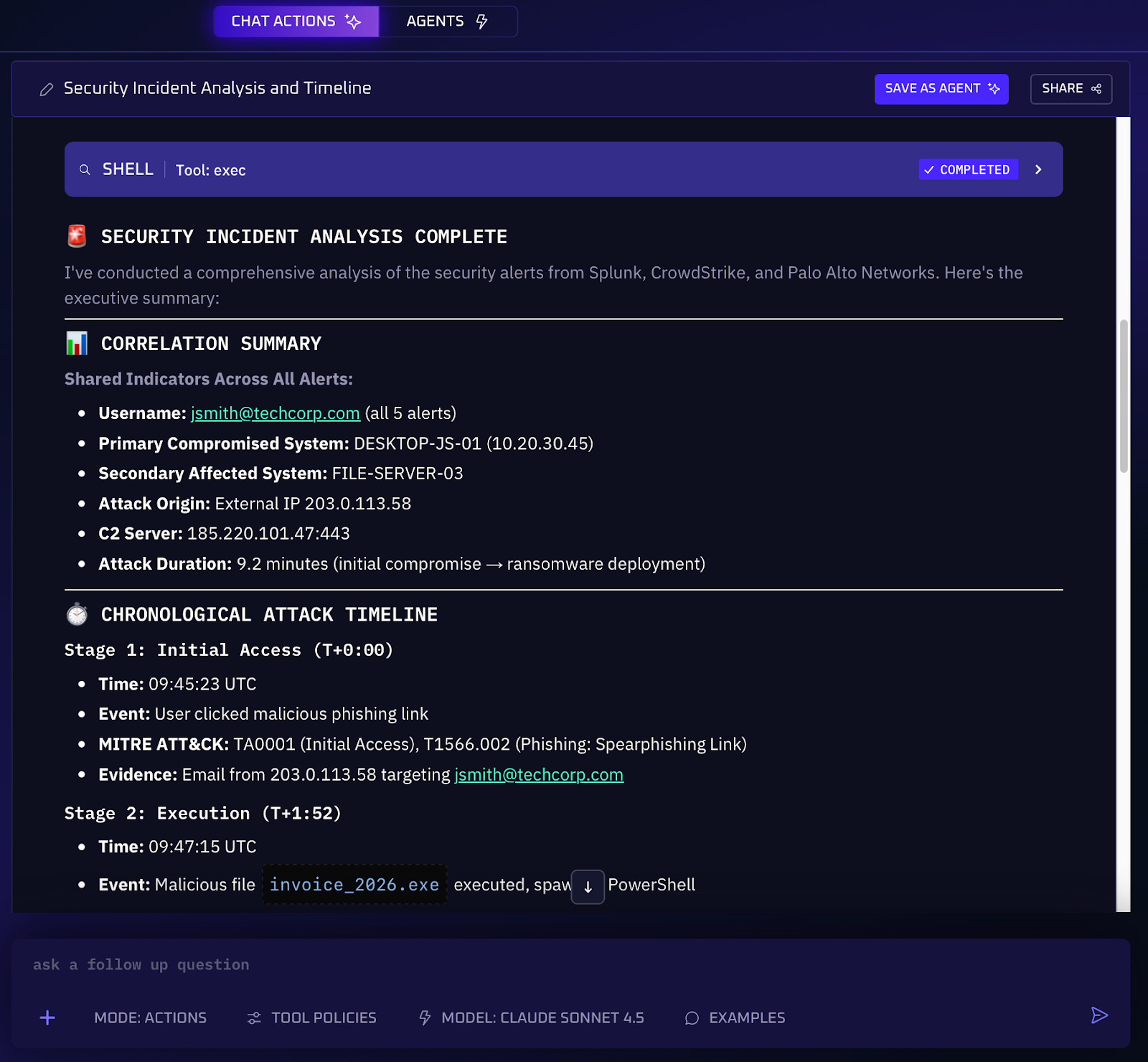
In a traditional SOC, analysts might spend hours stitching together clues from disparate tools to figure out what actually happened during an incident. An AI-native SOC eliminates that grind. This AI workflow aggregates telemetry from all sources in real time and uses vector embeddings and probabilistic modeling to correlate those signals into a coherent narrative. It might tie a suspicious login on an identity provider to a malware alert on an endpoint and a series of odd firewall logs, recognizing all as steps of the same breach attempt. The result is a clear end-to-end picture of the attack progression.
Workflow Steps (Attack Timeline Reconstruction)
1. The AI ingests alerts and raw logs from all your tools (cloud platforms, EDR, NDR, IAM, etc.) into a unified investigation data store.
2. It analyzes attributes like timestamps, usernames, IPs, and processes to find connections between events. Related activities are linked together along a timeline, revealing the attacker’s path.
3. The agent identifies the initial entry point or trigger (e.g. a phishing email or vulnerable service exploit) that started the chain of events. It notes how the incident began and subsequently spread, without requiring an analyst to manually correlate logs.
4. As it builds the timeline, the AI layers on context, which hosts or user accounts were affected, what data might have been accessed or exfiltrated, so the scope and impact are evident. It may map actions to MITRE ATT&CK tactics to describe the adversary behavior.
5. Within seconds, the SOC platform can generate an incredibly detailed incident summary or visual timeline for the analyst, showing the chronological sequence from infiltration to remediation. Key evidence (log snippets, file hashes, etc.) is attached at each step for drill-down.
Value of Automation
By synthesizing raw data into an intelligible incident narrative, AI drastically reduces investigation time. Instead of hunting through logs for hours, analysts get an instant timeline with root cause and key events identified. This not only speeds up response; it ensures nothing is overlooked due to human error or fatigue. Case studies have shown that AI-powered incident correlation can cut investigation times by 50% in practice. The tier-2 and tier-3 analysts who once had to do heavy log-diving can now focus on validating the AI’s findings and hunting deeper threats, while the AI handles the tedious data crunching.
2. Real-Time Threat Prioritization
Most security analysts are inundated with alerts, far too many to address individually. An AI workflow tackles this by filtering out benign or low risk events and ranking the truly important incidents at the top of the queue. The goal is that responders always deal with what matters most first, without drowning in false positives. Consider that a typical SOC receives thousands of alerts per day and spends hours in manual triage. A real-time AI prioritization engine can triage this firehose in seconds. It evaluates each alert against contextual data—including asset criticality, historical baselines, and UEBA (User and Entity Behavior Analytics) signals—to calculate a dynamic risk score. Each alert or event is then given a risk score or priority label.
Workflow Steps (Risk-Based Alert Triage)
1. As alerts come in, the AI attaches context, for example, tagging an alert with the asset’s importance (crown jewel server vs. test machine), whether the flagged IP appears on threat intelligence blacklists, or if the affected user has a history of risky activity.
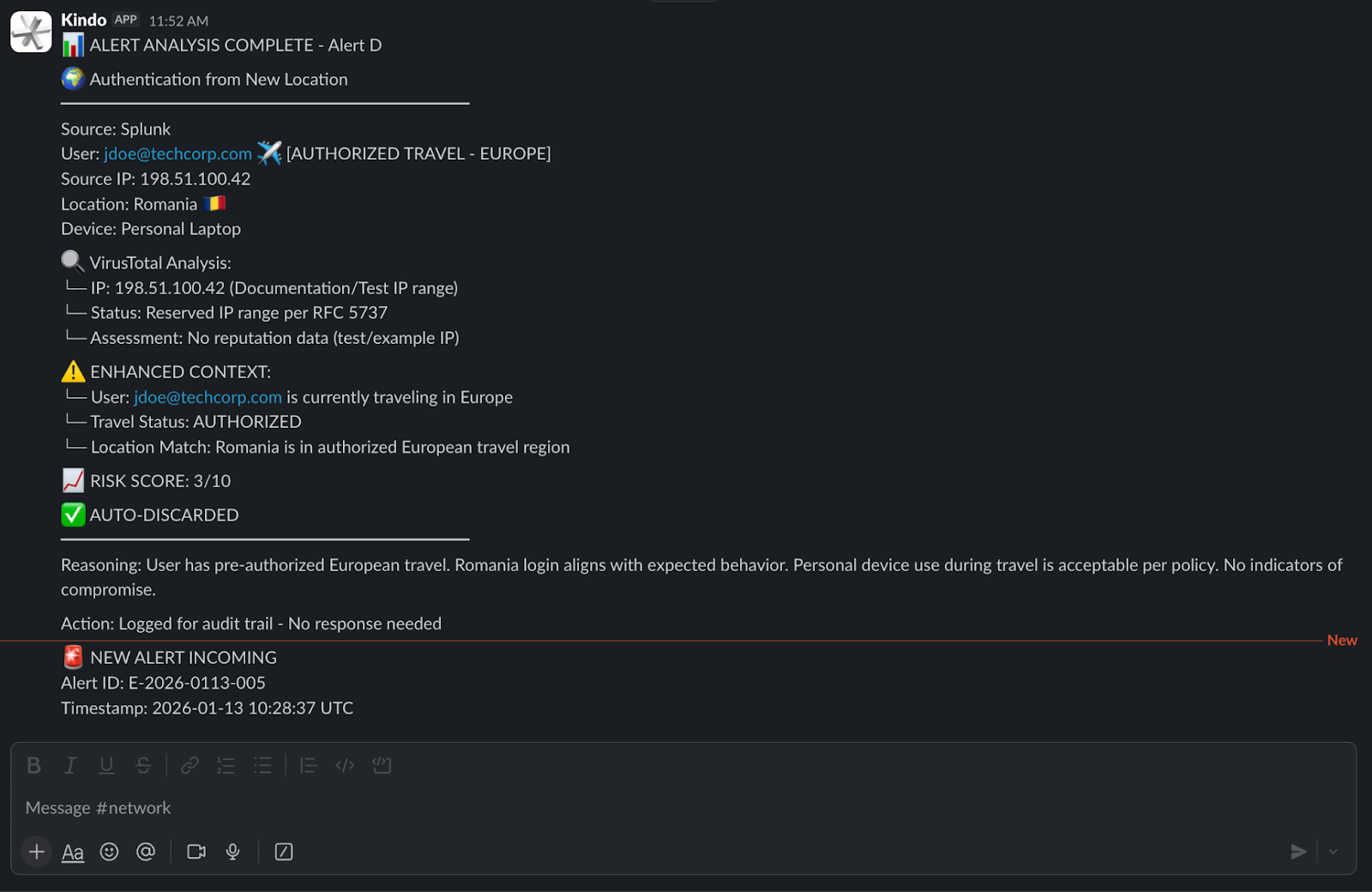
2. Using that context and learned patterns of true threats, the system calculates a risk or confidence score for the alert. An advanced model can weigh factors like attack type, any important assets involved, and anomalies against typical behavior.
3. If an alert’s score falls below a certain threshold (indicating likely false positive or insignificant impact), the AI can automatically deprioritize or even discard it. Going further, repetitive alerts that match a known benign behavior pattern can be auto-closed with an explanation.
4. Alerts that score high are immediately escalated, e.g. flagged in the dashboard, sent to on-call pager, or triggering an automated response. The system might re-order the incident queue so that analysts see the most urgent issues first.
5. The prioritization model adapts over time. It learns from analyst feedback (which alerts were true incidents, which were false alarms) to refine its scoring. This ensures that as your environment and threats change, the AI’s filtering remains effective in showing real threats.
Value of Automation
Real-time AI prioritization reduces alert fatigue. By some estimates, analysts waste nearly 3 hours a day sifting through alerts and still miss a large chunk of them. An AI that triages and ranks alerts frees up those hours, so your team can trust that the few alerts hitting their dashboard truly merit attention. This improves mean time to detect (MTTD) because the important alerts aren't buried in a sea of trivial notifications. It also boosts morale and retention. With less time spent on mind-numbing false positives, analysts can concentrate on investigation and threat hunting.
3. Automated Containment & Response
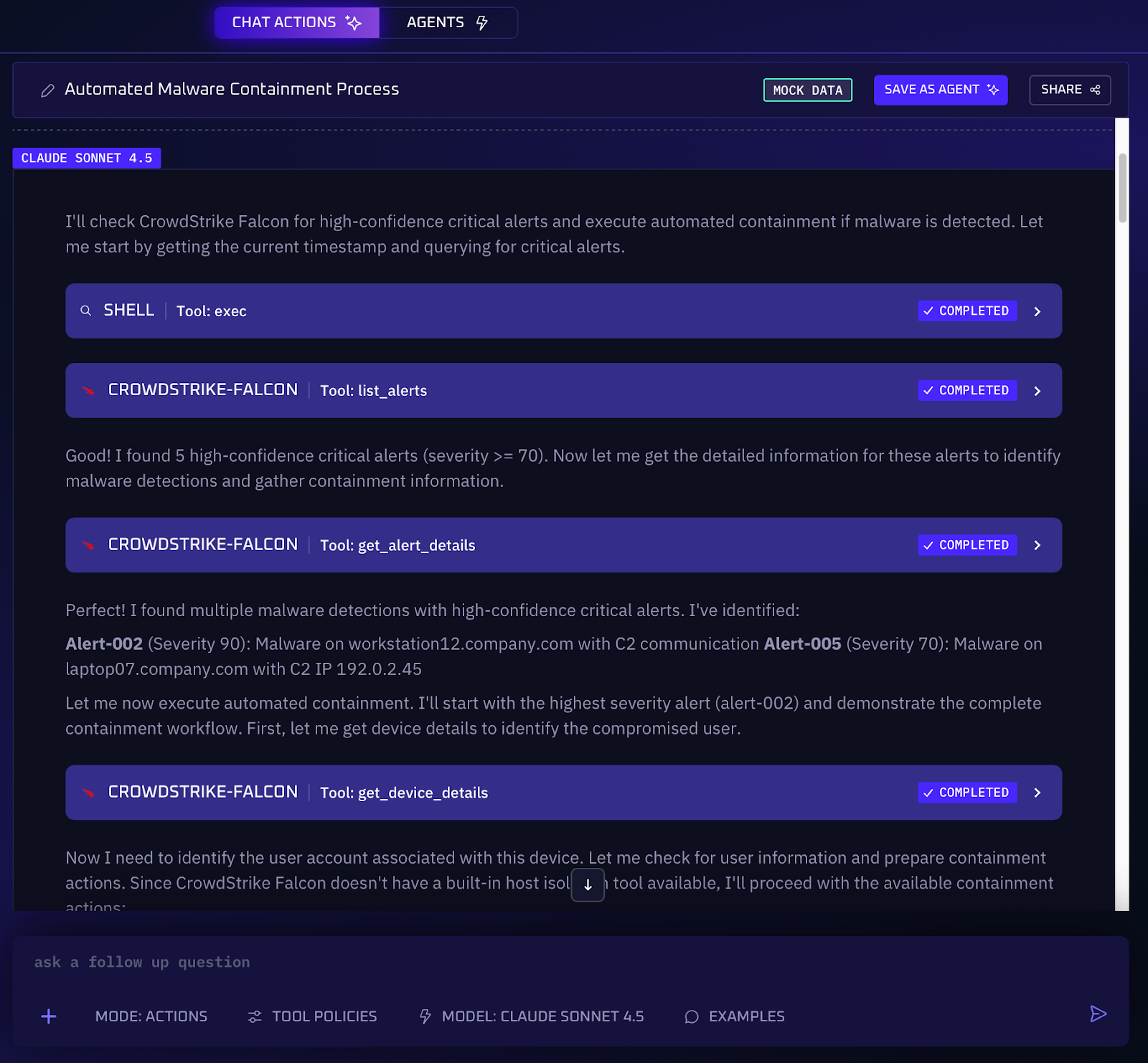
When a real incident is confirmed, responding quickly is one of the most important factors. With many SOC teams today, containment might involve jumping into a firewall console to block an IP, then an EDR tool to isolate a host, then an identity platform to disable a user. It's basically a series of manual steps prone to delays. An AI-native SOC flips this script. You simply specify the desired outcome ("isolate the compromised host"), or the system decides based on policy, and Kindo executes deterministic actions via API integrations in seconds across your stack. It then checks that those actions succeeded in shutting down the threat.
Workflow Steps (Autonomous Threat Containment)
1. The workflow kicks off when a high-confidence incident is identified, for example, a validated malware infection or an analyst issuing a containment command via the AI assistant.
2. The AI agent translates the intent (“isolate host X” or “block threat Y”) into concrete actions across systems. It might instruct the EDR to quarantine the endpoint, update NAC (network access control) or cloud security group rules to cut off that host’s network access, and suspend the user’s account in IAM if credentials are compromised.
3. In addition to isolation, the agent can remediate active threats. It can terminate malicious processes or containers, delete or quarantine malicious files, and block any malicious IP addresses or domains associated with the attack (e.g. adding them to firewall blocklists).
4. After executing actions, the AI double checks the outcome. It might poll the endpoint to ensure it’s truly offline, confirm the malicious process is no longer running, and monitor network logs to see that traffic from the threat has ceased.
5. Finally, the agent logs all actions taken and results. If any step fails (e.g. a firewall API call didn’t go through) or if the threat persists, it can immediately escalate to a human or attempt a fallback action. Otherwise, it can mark the incident as contained and even trigger recovery workflows (like prompting for device reimaging).
Value of Automation
By automating containment and response, the SOC gains actual machine speed reaction times that blunt attacks before they spread. Malicious activity can be stopped within seconds of detection, not hours, reducing potential damage. This level of speed is virtually impossible to achieve with manual processes. AI response also ensures consistency. Every time a given scenario occurs, the agent carries out the approved containment steps exactly as defined, eliminating the risk of human error under pressure. Analysts are freed from scrambling through multiple consoles and can instead supervise and handle exceptions.
4. IOC Enrichment & Adaptive Detection
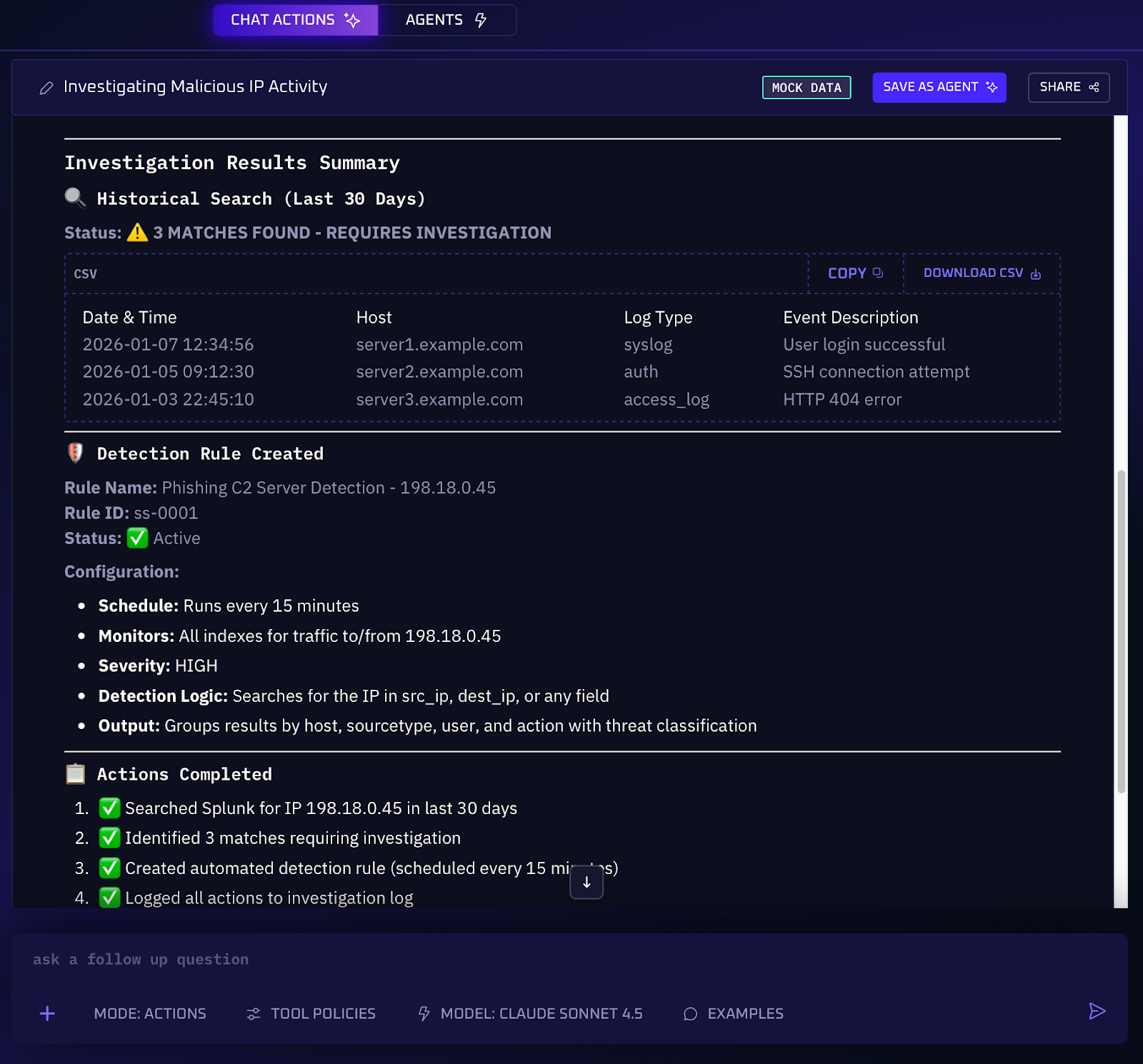
In a standard SOC, threat intelligence generally lives in separate systems and gets applied ad hoc. An AI approach automatically ingests fresh indicators (malicious IPs, domains, file hashes, TTP patterns) and weaves them directly into your detection logic in near-real time. When a threat feed flags a new phishing C2 server, for example, a legacy SOC waits for someone to manually update a blocklist. An AI-powered SOC instantly cross-references that IP against your network logs and asset inventory. If there's a match, it raises an alert or takes action; if not, it deprioritizes. The AI can also update detection rules on the fly, like watching for future traffic to that IP only from high value assets, making detections both timely and high confidence. The same cycle applies to malware hashes, suspicious domains, and emerging attacker techniques.
Workflow Steps (Intelligence-Enriched Detection)
1. The agent ingests threat intelligence from multiple sources 24/7, including commercial feeds, open source intelligence (OSINT), industry sharing groups, etc. This can include IOCs ingested via standard formats like STIX/TAXII, covering IPs/domains, file hashes, attacker TTPs, and vulnerability bulletins.
2. For each indicator, the AI enriches it with additional context. It might pull reputation data (ie. has this IP been seen in botnets?), geo-location, associated threat actor or malware family, and prevalence in your environment. Enriching raw indicators with such context transforms them into actionable intelligence, making it clear which ones are truly relevant.
3. The enriched intelligence is then evaluated for relevance to your organization. AI can determine which threats actually apply to your assets and users. If a malware’s C2 domain targets a software stack you don’t use, the system knows to ignore it. Conversely, an IOC tied to an APT known to target your industry would be scored higher.
4. The workflow adapts detection rules based on the new intelligence. High risk IOCs can be fed directly into your SIEM/XDR as new correlation rules or appended to existing ones (e.g. adding a newly seen phishing domain to your email filter rules). This happens automatically and quickly, without waiting for a human to write or tune the rule.
5. As these new detection rules run, the AI monitors their performance. If a rule fires frequently but turns out to be false alarms, the agent can dial it down or add conditions (for instance, require two different IOCs to match). If a rule never fires, it might expire after some time to reduce bloat.
Value of Automation
This workflow turbocharges your detection capabilities by ensuring your defenses always use the latest intelligence without drowning you in useless alerts. The tedious labor of parsing threat reports and updating dozens of tools is entirely offloaded to AI. As a result, your mean time to cover new threats shrinks: indicators of compromise can become active detection signals within minutes. Enrichment also provides context to avoid false positives, allowing teams to focus on the dangerous threats that matter.
5. Evidence Gathering & Post-Incident Reporting
After the firefight of an incident is over, teams face the tedious (and somewhat less exciting) work of evidence collection and reporting. This usually means pulling log excerpts, copying analysts' notes, documenting what was done and when, and compiling all of that into an incident report or ticket update. It’s a task for compliance and learning purposes, but it’s often viewed as grunt work and can be error-prone if rushed. Here, an AI workflow shines by handling the entire post-incident documentation process. The agent can compile all relevant artifacts and conversations and produce an audit-ready report mapped to frameworks like NIST SP 800-61 or ISO 27035. This results in comprehensive, standardized documentation that accelerates compliance.
Workflow Steps (Post-Incident Automation)
1. Once an incident is resolved or moves to the post-analysis phase, the AI agent gathers all related data. It pulls system logs, alert data, case notes from the ticketing system, and any forensic dumps or PCAPs that were captured. If analysts used chat or ITSM platforms to manage the incident, the agent can grab those transcripts as well.
2. The agent consolidates the sequence of events (from initial alert to final remediation) into a timeline, attaching the supporting evidence for each step. It might bundle the login logs showing an intruder’s activity, followed by the EDR alerts of malware, and then the records of containment actions. Screenshots or queries run can be included to provide complete context.
3. Every action taken during response is documented. The AI lists what automated actions it executed (e.g. “Host X isolated at 14:32 UTC”), as well as any manual actions by analysts, along with timestamps. This creates a full audit trail with who/what performed each step, ensuring traceability and compliance evidence.
4. The report shows the root cause of the incident (e.g. “initial compromise via phishing email exploiting vulnerability CVE-XXXX”) and the impact scope (“affected 3 user accounts and 2 servers; no evidence of data exfiltration beyond 10MB outbound traffic”). These insights are derived from the investigation data the AI correlated earlier.
5. Finally, the agent composes a comprehensive incident report. It can fill in predefined templates with the collected information, including an executive summary, the detailed timeline, remediation steps taken, and recommendations for future prevention. This report is then saved to the incident management system or sent to stakeholders automatically.

Value of Automation
No one enjoys writing long incident reports right after firefighting a breach, and with AI, they no longer have to. Automating evidence collection and report generation saves enormous time and ensures accuracy. All relevant data is captured in context, eliminating the chance that a harried analyst forgets to include a log or misstates a timeline. The resulting reports are thorough and consistent across incidents, providing reliable documentation for compliance auditors or post-mortem reviews.
Take Your Next Steps With Kindo
By embracing these five AI-powered SOC workflows, from automated incident correlation to self-updating detections and hands-free reporting, security teams can transform how they operate. The common theme is unification and intelligence.
Instead of bouncing between siloed tools and manual tasks, analysts work in one smart platform that handles the heavy lifting. Detection is effortlessly tied to response, and every action is backed by reasoning and verification. The end result is a SOC that is far leaner and faster, yet more effective.
This is exactly what Kindo delivers. As an AI-native control plane for DevSecOps, Kindo unifies your signals, correlates incidents, prioritizes threats, executes containment with guardrails, and verifies resolution. It turns these workflows into something your team can actually manage day-to-day. If you want SOC results that keep pace with adversaries rather than adding more tools to manage, book a demo with us today.
FAQs
Yes, AI agents can execute containment actions such as isolating endpoints, blocking IPs on firewalls,or suspending user accounts via API integrations, often requiring human approval only for sensitive assets.
Traditional SOAR relies on static, pre-defined playbooks that break when API schemas change. AI-native SOCs use probabilistic reasoning to adapt to new threats and tool updates dynamically.
AI reduces alert fatigue by automatically filtering false positives and grouping related alerts into single incidents. This prevents analysts from wasting time on benign events and focuses attention on high fidelity threats.
An AI-native SOC workflow is an automated security process that uses artificial intelligence to ingest telemetry, correlate incidents, and execute response actions across disparate tools without manual intervention.