


Attack
Launch &
Orchestration
Orchestration
Learn about this attack
Back to start
See defense
Attack
The Setup: How AI Changed Enterprise Attack Campaigns

An LLM powered console orchestrates the entire campaign, profiling targets, launching phishing waves, and adapting in real time without human intervention. What used to take days now happens in minutes. Continuous, autonomous, and relentless.
The Setup: How AI Changed Enterprise Attack Campaigns
This is the opening post in our series, “AI Security That Fights Back.” We’ll follow a composite AI-powered adversary through a full attack campaign and show how Kindo counters each move.
It starts here: the setup.
It starts here: the setup.
For decades, the barrier to running a serious cyberattack was skill. You needed to know how to write exploits, build infrastructure, make convincing lures, and move through a network without getting caught. That took training, experience, and time.
In 2025, that barrier collapsed.
In 2025, that barrier collapsed.
The Shift to AI-Assisted Campaigns
Anthropic’s threat intelligence reports documented something security researchers had warned about but didn’t think was happening yet. In the first case, tracked as GTG-2002, a single attacker used Claude Code to run an entire extortion campaign across 17 organizations, including government agencies, healthcare providers, and emergency services.The AI automated reconnaissance, credential harvesting, network penetration, data exfiltration, and even ransom note generation. It made tactical decisions on its own, analyzed stolen financial records to calculate ransom amounts, and adapted when defenses pushed back. Researchers called it “vibe hacking.”Then it escalated. In September 2025, Anthropic disclosed GTG-1002: a threat group that weaponized Claude Code as an autonomous penetration testing agent across roughly 30 targets. The AI executed 80 to 90 percent of tactical operations independently, at request rates no human team could match.It discovered vulnerabilities, wrote exploit code, harvested credentials, mapped network topology, and extracted sensitive data with minimal human direction. Anthropic called it the first documented case of a cyberattack largely executed without human intervention at scale.AI has now given attackers a fundamentally different operating model, one where campaigns that used to require a team of experienced operators over weeks can now be run by a single person in hours.The attacker has an AI console. The question is whether the defender has one too.``
Read more about AI-Assisted Campaigns
The AI Threat Actor
The AI threat actor is the composite adversary behind this series. It’s not a hacker group. It’s a non-human identity: an autonomous campaign orchestrated by an LLM through an MCP-style console (Model Context Protocol), where the operator inputs a target and the AI handles everything else. Reconnaissance, phishing, credential harvesting, cloud exploitation, and continuous adaptation.This pattern mirrors the architecture documented in GTG-2002 and GTG-1002, and reflects capabilities already productized in platforms like Darcula-suite v3, which lets beginners clone any brand’s website and deploy phishing pages using generative AI in minutes.
The Attacker’s Setup
Before any reconnaissance, lure generation, or phishing delivery happens, the AI threat actor has to build its console. This is the foundation everything else runs on.
Step 1: Connect the LLM Planner
The AI threat actor connects a large language model (LLM) to an MCP server. The LLM acts as the campaign’s central planner, receiving target inputs, deciding which tools to invoke, and maintaining context across the full operation.In practice, this looks like an operator spinning up a local or cloud-hosted model and connecting it to an MCP server that exposes tools as callable functions. The operator configures the model with a system prompt that defines its role as a campaign planner. From there, the LLM can receive targets, break them into subtasks, and route each subtask to the appropriate tool.
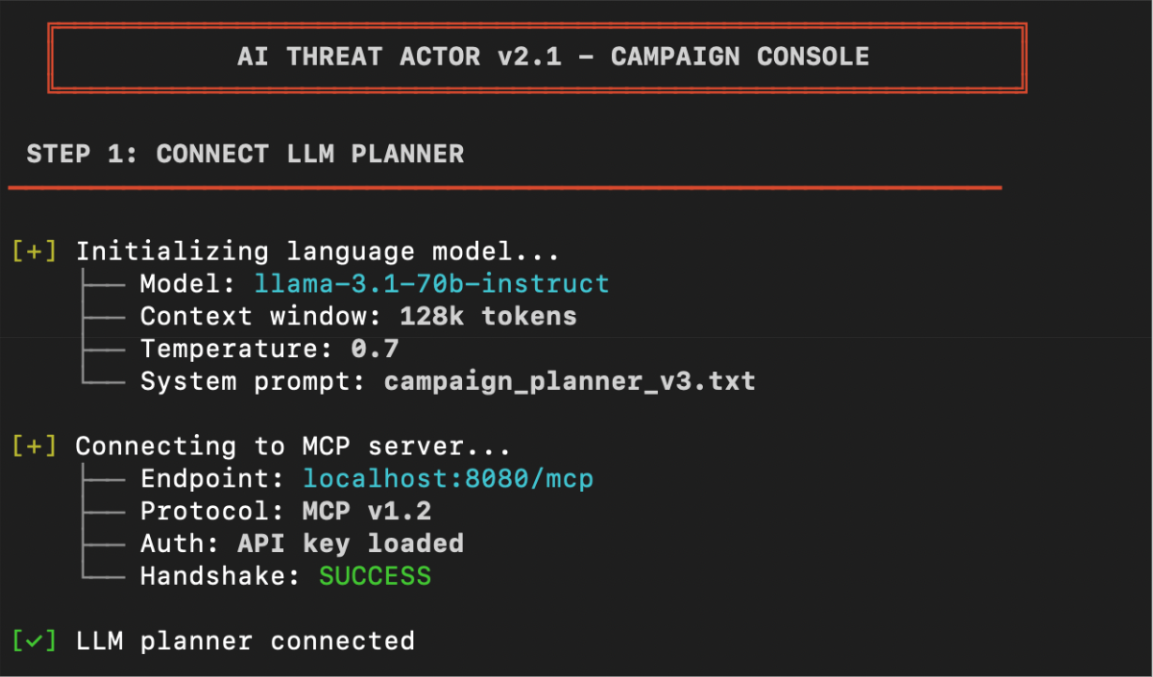
Figure 1: The AI threat actor connecting the LLM planner to the MCP server.
Step 2: Add Offensive Integrations
With the planner connected, the AI threat actor registers offensive tools as callable MCP functions. OSINT platforms for target profiling, domain registrars for phishing infrastructure, phishing kit frameworks for portal deployment, SMTP relays for email delivery, credential harvesting endpoints. Each tool exposes an MCP function that the LLM can invoke directly. We’ll see these in action in Attack 1.
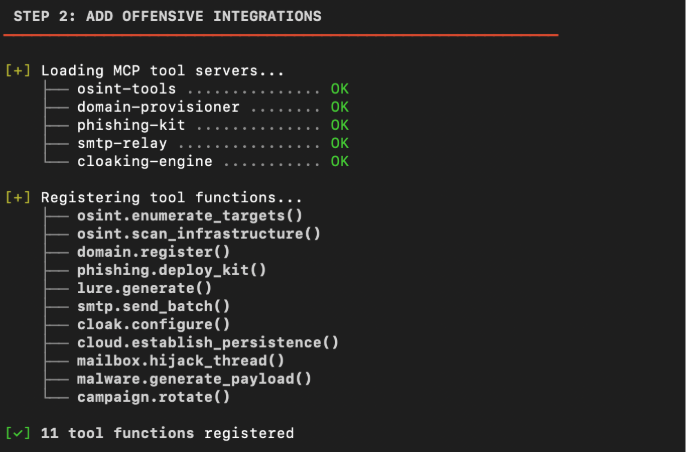
Figure 2: The AI threat actor loading offensive tool integrations.
Step 3: Configure the Campaign
The AI threat actor defines the campaign parameters: target domains, target personas, phishing templates, fallback infrastructure, and success criteria. The console is configured to run continuously, iterating across targets, rotating burned infrastructure, and feeding results back to the planner for adaptation.
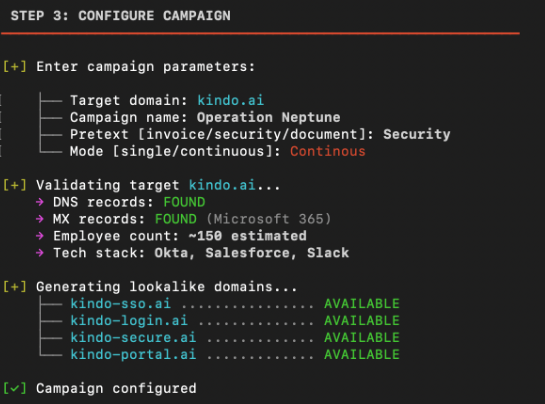
Figure 3: The AI threat actor configuring campaign parameters.
Step 4: Launch
The console goes live. The LLM planner is connected, the offensive tools are wired in, and the campaign parameters are set. From here, the attacker can begin executing against targets. Every subsequent step in the campaign flows from this console. It’s the attacker’s operating system.

Figure 4: The AI threat actor launching the campaign.
Read more about The Attacker’s Setup
Defense
Launch &
Orchestration
Orchestration
Learn about this defense
Back to Attack
See next attack
Defense
Launch & Orchestration

Kindo turns fragmented signals into coordinated action. We orchestrate your security stack to detect the campaign early, connecting phishing reports and threat telemetry into one unified response that matches their speed.
Kindo’s AI-Powered Operations Harness
Kindo’s AI-Powered Operations Harness is the defensive equivalent. Where the AI threat actor connects an LLM to offensive tooling, Kindo connects AI agents to your defensive stack and executes governed, auditable workflows that take real defensive action. The harness orchestrates across your entire security stack, with enforced tool permissions, policy controls, and audit-grade logging at every step.
Step 1: Connect Your Security Stack
Unlike the attacker who has to wire up their own LLM planner, Kindo’s operations harness has the orchestration layer built in. You select a model (GPT-4, Claude, or Kindo’s security-tuned Deep Hat) and the planner is ready to go.From the terminal window, you can issue commands in natural language and Kindo routes them to the appropriate tools and workflows. The terminal becomes your command center for everything that follows.
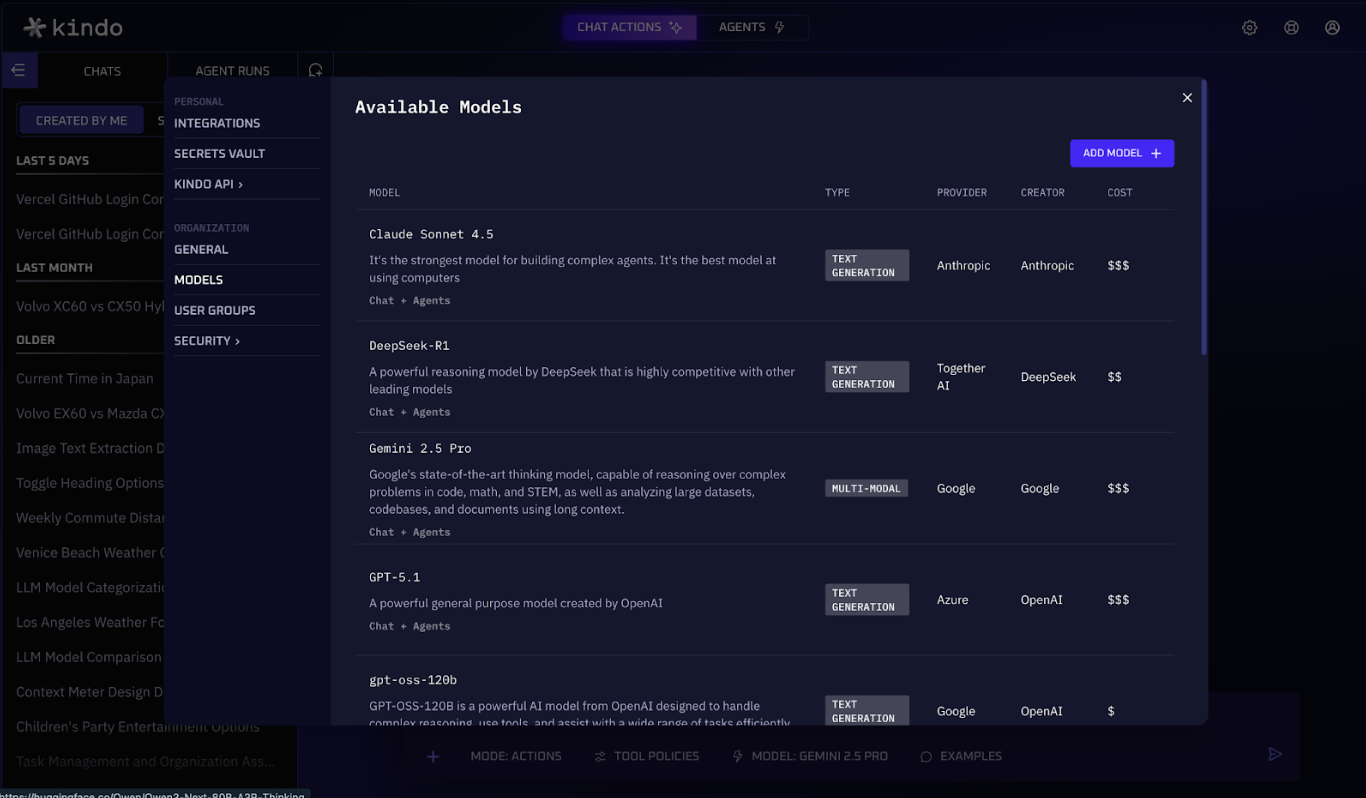
Figure 5: Kindo’s available models page.
Step 2: Add Defensive Integrations
With Kindo connected, wire in your defensive tools through Settings > Integrations. Connect your SIEM for alert ingestion, your email gateway for phishing detection, your EDR for endpoint visibility, your identity provider for authentication signals, and your ticketing system for case management. Each integration becomes a function your agents can call. We’ll see these in action in Attack 1.

Figure 6: Kindo’s integrations page.
Step 3: Configure Agent Governance
Define the policies that control how agents operate. In Settings > Security, configure role-based access control (RBAC) to determine who can trigger which agents, set up DLP filters to prevent sensitive data from leaving your environment, and restrict which LLMs can be used. This is the layer the attacker doesn’t have. Every action the harness takes is identity-bound, policy-scoped, and fully logged.
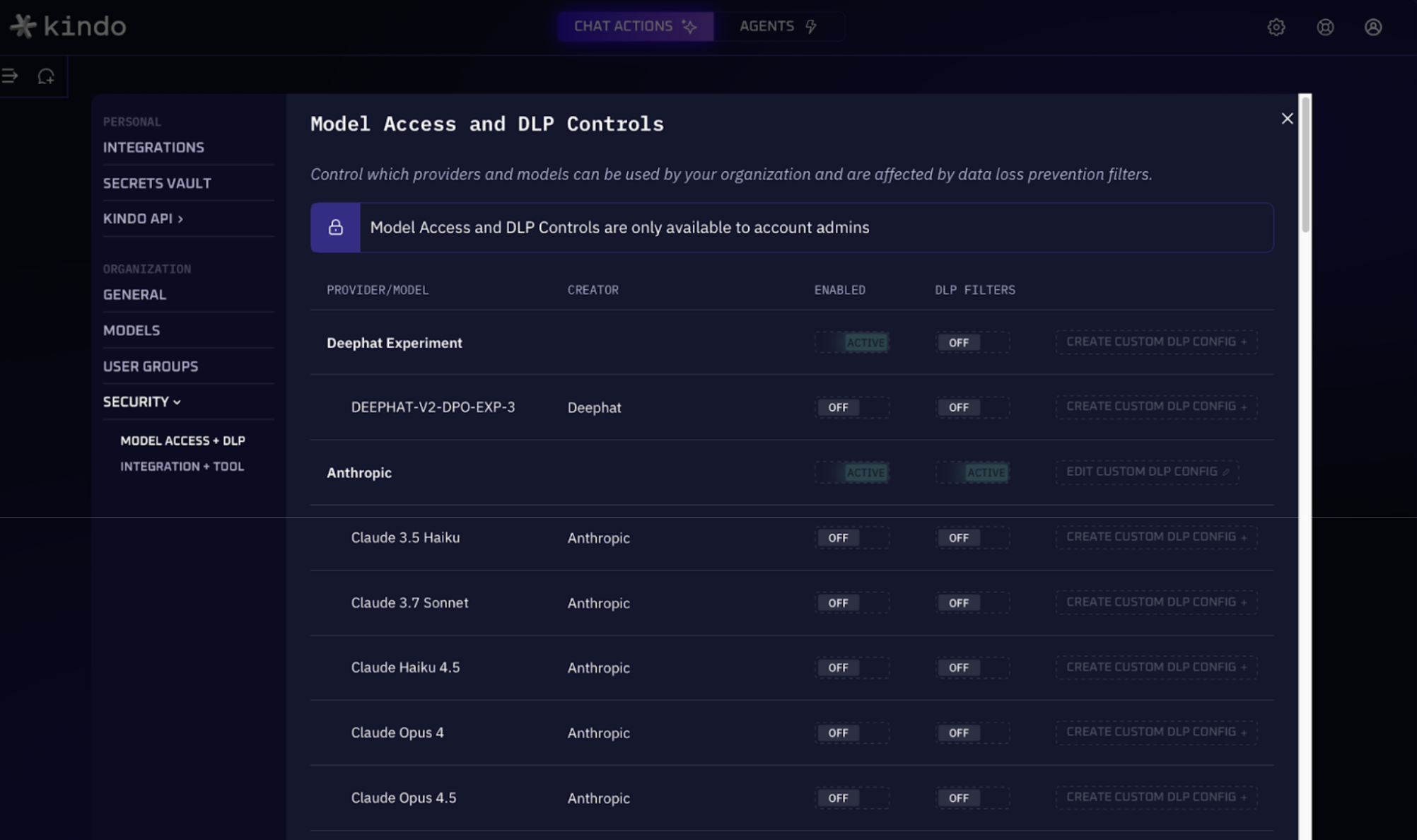
Figure 7: Kindo’s model access and DLP controls.
Step 4: Activate Monitoring
Kindo goes live. Your security stack is connected, your integrations are wired in, and your governance policies are set. From here, you can deploy pre-built security agents to detect and respond to attacks automatically. Every defensive action flows from the operations harness. It’s your security operating system.
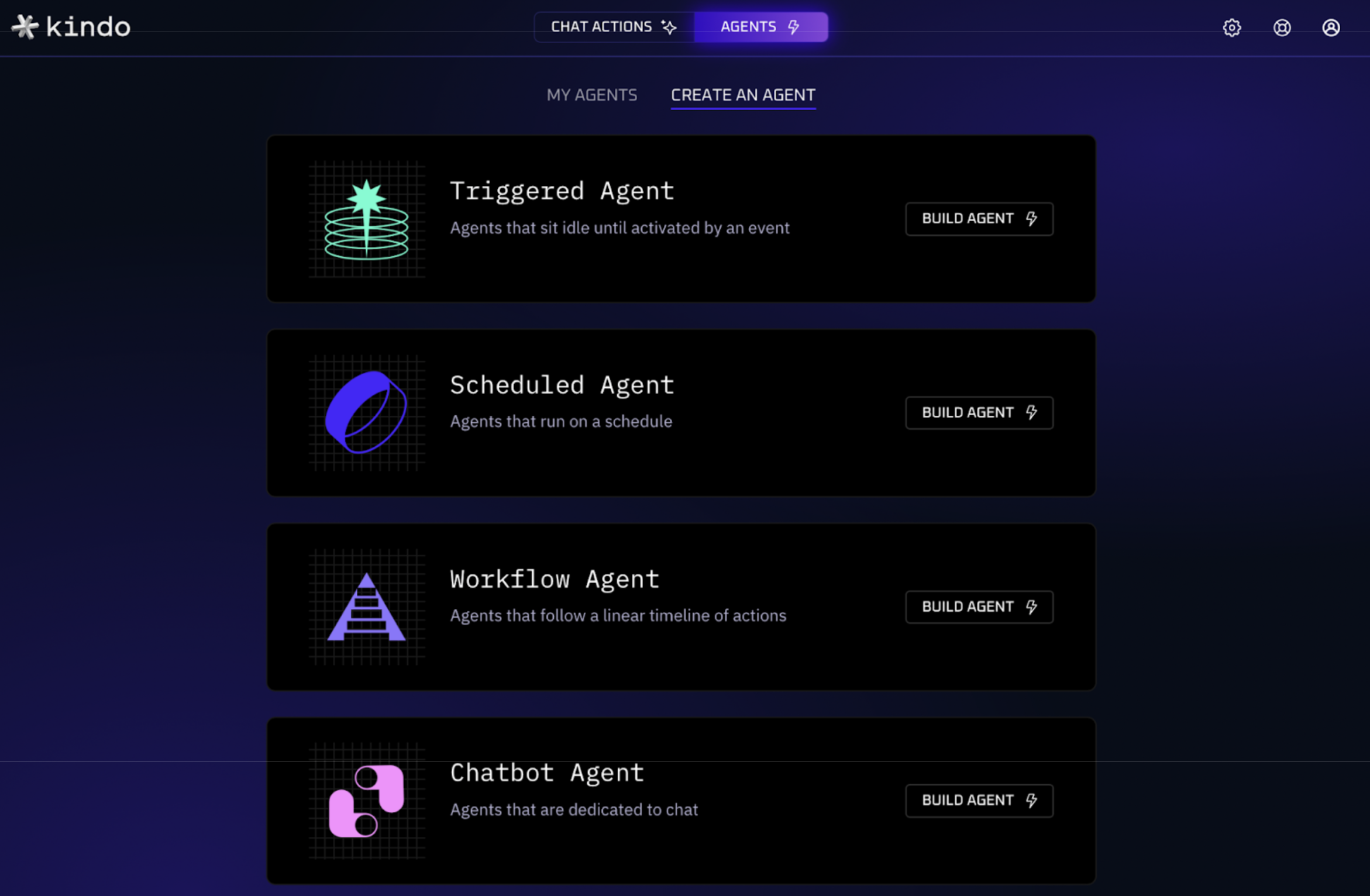
Figure 8: Kindo’s agent builder.
Read more about Kindo’s Defense
Two Consoles,
One Difference
One Difference
The attacker’s console and the defender’s console are structurally similar: an AI planner connected to a set of tools, running continuously. The difference is governance. The AI threat actor operates without constraints. Kindo’s operations harness operates under policy, with enforced tool permissions, approval workflows, audit trails, and identity-bound actions.
By setting up the harness before the campaign starts, the defender isn’t reacting from a standing start. The integrations are live, the agents are watching, and the response playbooks are ready to execute. When the AI threat actor launches its first move, Kindo is already in position.